
Bridging communication tools
Agency partners likely use Microsoft Teams and Microsoft Office, and do not have access to Slack or Google Workspace. Additionally, there can be technical limitations if an agency partner is on a different Microsoft tenant. This guide shares some solutions that we’ve found for working around these.
In this guide, an external user refers to a user in an agency that is on a different Microsoft tenant. Not all agencies are on a different Microsoft tenant. To determine if an agency partner is on a different Microsoft tenant, try adding someone from the agency in the To: line of an Outlook email, and check if “External” appears next to the contact. If so, they are an external user on a different Microsoft tenant.

Outlook calendar availability
Section titled “Outlook calendar availability”You may not be able to add the calendars of external users. However, you should be able to view their calendar availability via the “Scheduler” / “Scheduling Assistant” view”.
Microsoft Teams group chat
Section titled “Microsoft Teams group chat”Live chat communication can be a lot smoother than emailing back and forth. Agency partners do not have Slack access, and use Microsoft Teams instead.
Creating a Teams meeting creates a chat, but these chats can get clogged with meeting chatter. Additionally, access to the chat can get messed up when attendees decline the meeting invite. Instead, we recommend creating group chat(s) with agency partners, as follows:
- Follow these instructions to create a group chat
- If the agency is on the same Microsoft tenant, only one
Guestcontact will appear - If the agency is external, make sure to add the contact tagged as
External, and not the one tagged asGuest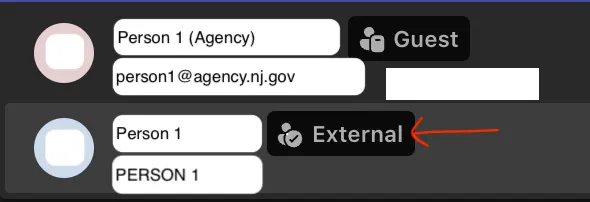
- If the agency is on the same Microsoft tenant, only one
- Follow the same instructions page to name the group
- You can create a section in Teams to organize these chats above any meeting chats
Make sure to configure notifications as desired for messages on Teams.
Sharing documents
Section titled “Sharing documents”Agency partners do not have Google accounts, and do not have access to Google Drive or Google Workspace. Options for sharing files with agency partners include sharing via Sharepoint or OneDrive. Neither are great, especially when it comes to sharing with external users.
Pros of Sharepoint/Cons of OneDrive:
- Organizational ownership
- A OneDrive folder that is shared is still primarly owned by a single person. Whereas a Sharepoint is collectively owned by the owning organization.
- Organization-wide link access
- Sharepoint allows creating links that can be accessed by anyone in the organization that owns the Sharepoint. E.g., if the Sharepoint is owned by NJIA, it is possible share a link to the Sharepoint home, or to a given folder or file, that is accessible by everyone in NJIA even if you didn’t specifically grant them access. Unclear of this is possible in OneDrive.
Pros of OneDrive/Cons of Sharepoint:
- Potential Sharepoint limitations on moving files
- Microsoft docs suggest that moving files should be possible. However, at least one project has not been able to do this, the move option is simply not there.
- The Doula Medicaid project experienced this, and had to download and re-upload files to move them between folders.
- Direct links to Sharepoint files cannot be accessed by users who are external to the Microsoft tenant that owns the Sharepoint
- This is the case even if the external user has sitewide, “Site owners - full control” access to the Sharepoint
- This means that if the Sharepoint is owned by NJIA, and an agency partner is external, you need to remember not to send or hyperlink direct links to files.
- If you do so, they will not be able to access the files.
- You have to instead share the link to the Sharepoint homepage, convey where in the directory structure the file is, and have agency partners click through the folders.
- Unclear if this is the case with OneDrive, though we suspect not due to the next point
- Clearer and more granular access control on OneDrive
- There have been mentions that OneDrive allows more granular access control for sub-folders, in a way that is easier to understand than Sharepoint
- Cumbersome to sync a local copy of Sharepoint files
- If stakeholders will be making a lot of edits, they may be more familiar and comfortable with having and editing a local copy of e.g. a Microsoft Word doc. Or, you might have frustrations with using Microsoft Online and prefer using Microsoft’s desktop appliations.
- It is easy to set up this local syncing in OneDrive; you and agency partners probably already have this set up.
- Sharepoint has two options for syncing files. However
- The recommended option is to use OneDrive shortcuts. However, these seem to only work at least one folder level down from the Sharepoint root. It does not seem possible to create a OneDrive shortcut for the root/home of the entire Sharepoint
- The other option, syncing, might be worth considering
- Both options require cumbersome set up that might be difficult to direct less tech-savy agency partners to configure
If you would like to set up a Sharepoint, consider whether you want NJIA or the agency partner to own the Sharepoint, given the tradeoffs above. If you want NJIA to be the owning organization, create a Tech Ops ticket to request a Sharepoint.
NJIA Powerpoint slides template
Section titled “NJIA Powerpoint slides template”NJIA has a presentation deck template on Google Slides. Microsoft Powerpoint does not have templates, but one can export the Google Slide as .pptx, and import them into Powerpoint.
Other limitations that have yet to be solved
Section titled “Other limitations that have yet to be solved”See this thread for additional conversation and considerations.
Teams calls do not allow screen annotations while controlling the shared screen
Section titled “Teams calls do not allow screen annotations while controlling the shared screen”Microsoft teams has a tool to enable people to draw and annotate on a shared screen.
We have not figured out how to @-mention external users on shared Microsoft Online documents
Section titled “We have not figured out how to @-mention external users on shared Microsoft Online documents”There have been reports of not being able to @-mention external users, or potentially not being able to @- mention anyone in some circumstances on shared spaces (unclear).
One option is to get an agency email account. However, a separate account means a separate calendar that is not synced with your NJIA calendar.
Microsoft Online bugs and friction
Section titled “Microsoft Online bugs and friction”Microsoft Office is not as online-native as Google Workspace. Editing files in the browser using Microsoft Online tools can have weird bugs, from visual bugs to losing recent changes. One alternative is to sync a local copy (e.g. via OneDrive), and edit the file locally using desktop Microsoft applications.
Additionally, if any files go through heavy collaborative editing, the subpar behavior of Microsoft Online editors and presence of local files copies can cause Microsoft to create a second, parallel version of the file that then requires reconciliation. This is less likely to be a problem for engineers, then for large, text-heavy product documents.