
Request reviewers with Pickaroo
We have a collection of GitHub Actions that can be used to implement common Workflows to improve the efficiency of your projects. Alongside these Actions are also pre-configured Workflows that implement the most common of these, for your convenience.
View the innovation-shared-actions repository (internal).
Pickaroo reviewers workflow
Section titled “Pickaroo reviewers workflow”A common workflow at the office is to request a couple random reviews from engineers that are part of the broader initiative (i.e. ResX or BizX), but are external to the given project. This workflow automates that process and sends a Slack notification to a given channel, tagging the selected reviewers.
How it works
Section titled “How it works”The Pickaroo Reviewers workflow provides a complete solution for automated PR review assignment:
- Randomly selects reviewers from specified GitHub teams and/or individual users and assigns them to the PR.
- in addition to the exclude filters, it filters out any potential reviewers whose slack status shows as Sick, OOO, or on leave.
- Maps the selected reviewers to their Slack user id’s so they can be tagged in a Slack message.
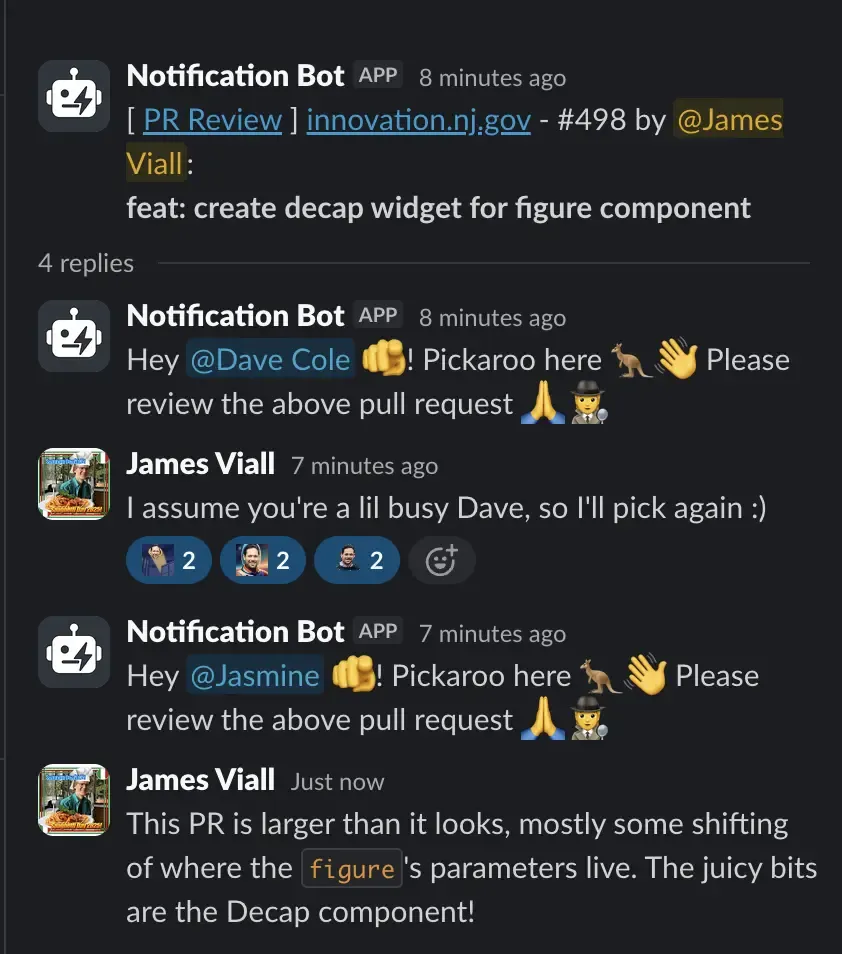
- Sends a formatted Slack message of the PR details, and mentions the reviewers in a threaded message.
- supports re-selecting additional reviewers on subsequent runs and tagging new reviewers in the same thread.
- Conveniently removes any labels that were added to the PR in in order to trigger the workflow run
- Supports a
showparameter (see our guidance on Ship/Show/Ask) to simply notify the given channel and skip selecting reviewers.
The results look something like this:
Requirements
Section titled “Requirements”Install the OOI Pull Request GitHub App
Section titled “Install the OOI Pull Request GitHub App”- Install the OOI Pull Request Github App in your repository. This might require creating a Tech-Ops ticket!
Repo must be in the same organization
Section titled “Repo must be in the same organization”This workflow consumes organization-level secrets. GitHub only allows access to shared workflow secrets if the calling repository is in the same GitHub org.
Add the Slack notification bot to your Slack channel
Section titled “Add the Slack notification bot to your Slack channel”Slack will block messages unless the bot is a member of the channel.
To add the bot:
- Open the Slack channel
- Add “Notification Bot” to the channel
- Ensure the bot appears in the channel’s integrations list
Adding your GitHub username to your Slack profile
Section titled “Adding your GitHub username to your Slack profile”In order to mention the author and any assigned reviewers in a Slack message, Pickaroo needs to be able to map a Slack user to a GitHub user. This is achieved by everyone either:
- Populating the
GitHub Usernamefield of your Slack profile with your username - Adding your GitHub username with a prefix to the
Name Pronunciationfield of your Slack Profile (this is a workaround for Multi-Channel guests) e.g."JAYN DOH" gh: jane-doeGithub: superman99 "klahrk kent"
Required secrets
Section titled “Required secrets”The workflow expects these secrets (already configured at the organization level):
OOI_PULL_REQUEST_APP- Private key for the GitHub AppSLACK_OAUTH_TOKEN- Slack OAuth token for sending messages
Inputs
Section titled “Inputs”| Name | Required | Type | Description |
|---|---|---|---|
include_teams | No | string | The github teams to pick reviewers from (space delimited) Must be a New Jersey GitHub Team |
exclude_teams | No | string | The github teams to exclude reviewers from (space delimited) |
include_users | No | string | Individual GitHub usernames to include (space delimited) |
exclude_users | No | string | Individual GitHub usernames to exclude (space delimited) |
number_of_reviewers | No | number | The number of reviewers to select, defaults to 1 |
number_of_repicks | No | number | The number of reviewers to select on subsequent runs of pickaroo, defaults to 1 |
show | No | boolean | If true, only post a Slack message without selecting reviewers |
channel_id | Yes | string | The Slack Channel ID to notify |
Using this workflow in your repository
Section titled “Using this workflow in your repository”Create a new workflow file, e.g. .github/workflows/request-reviewers.yml. You likely don’t want to auto-request reviewers for every pull request, and especially not every update, so you’ll want to create a workflow separate from your primary ‘CI’ workflow, and trigger it based on labels:
name: Pickaroo Reviewers
on:  pull_request:    types: ["labeled"]
jobs:  pr-review:    if: contains(github.event.pull_request.labels.*.name, 'pr-review')    uses: newjersey/innovation-shared-actions/.github/workflows/pickaroo.yml@main    secrets: inherit # required because the underlying workflow accesses org secrets    permissions: {} # we're not using the default GITHUB_TOKEN    with:      include_teams: "innovation-engineering"      exclude_teams: "my-project-team some-other-team" # multiple items are space-delimited      include_users: "specific-user another-user"      exclude_users: "dhcole"      number_of_reviewers: 2      channel_id: "C09Q34G9HMX" #required  pr-show:    if: contains(github.event.pull_request.labels.*.name, 'pr-show')    uses: newjersey/innovation-shared-actions/.github/workflows/pickaroo.yml@main    secrets: inherit # required    permissions: {}    with:      show: true      channel_id: "C09Q34G9HMX" # required
In the above example, when a PR receives a pr-review label, it will use Pickaroo to select 2 random reviewers and notify the given Slack channel. When a PR receives a pr-show label, Pickaroo will just notify the Slack channel and skip selecting reviewers thanks to the show parameter.
Other Recipes
Section titled “Other Recipes”Multiple rounds of picking
Section titled “Multiple rounds of picking”A common workflow is selecting one random reviewer from a project’s team and an additional reviewer from a broader cross-project group. You can achieve this by composing two separate Pickaroo jobs together and leveraging the number_of_repicks parameter.
jobs:  request-project-reviewers:    if: ${{ github.event.label.name == 'pr-review' }}    uses: newjersey/innovation-shared-actions/.github/workflows/pickaroo.yml@main    secrets: inherit    permissions: {}    with:      include_users: "timwright12 jviall aloverso"      number_of_reviewers: 1      number_of_repicks: 0 # never repick      channel_id: C03C7NHK9B4 # engineering-all
  request-initiative-reviewers:    if: ${{ github.event.label.name == 'pr-review' }} # second job, same label    needs: request-project-reviewers # avoid a race between jobs    uses: newjersey/innovation-shared-actions/.github/workflows/pickaroo.yml@main    secrets: inherit    permissions: {}    with:      include_teams: "innovation-engineering" exclude_users: "dhcole gamorgana"      # number_of_reviewers: 2 -- has no effect, see below      number_of_repicks: 2 # since this always runs second, it's always a re-pick      channel_id: C03C7NHK9B4 # engineering-all
Always picking the same reviewers
Section titled “Always picking the same reviewers”Some times you don’t want to randomly select reviewers be it from an internal or external team—you want the same reviewers every single time. Some teams achieve this by using CODEOWNERS, but depending on what’s ideal for your team you may prefer using Pickaroo to also benefit from the Slack notification. This can be done by simply specifying a number_of_reviewers that is equal to or greater than the number of people there is to pick from:
jobs: request-project-reviewers: if: ${{ github.event.label.name == 'pr-review' }} uses: newjersey/innovation-shared-actions/.github/workflows/pickaroo.yml@main secrets: inherit permissions: {} with: include_users: "timwright12 jviall aloverso" number_of_reviewers: 3 # always assign these three users channel_id: C03C7NHK9B4Or if you’re using include_teams
jobs: request-project-reviewers: if: ${{ github.event.label.name == 'pr-review' }} uses: newjersey/innovation-shared-actions/.github/workflows/pickaroo.yml@main secrets: inherit permissions: {} with: include_teams: "innovation-ccm" number_of_reviewers: 5 # there are 5 users on the innovation-ccm team channel_id: C03C7NHK9B4Additional PR labels
Section titled “Additional PR labels”You can always create as many additional jobs triggered on different PR labels to run Pickaroo with different parameters if your team so desires!
Pickaroo action
Section titled “Pickaroo action”For more complex workflows or custom integrations, you can use the underlying Pickaroo action directly. This gives you control over the reviewer selection process, however this isn’t recommended as there are many other features of the Pickaroo workflow other than just review selection that you’ll miss out on and will have to setup manually, and then you’ll be stuck with maintaining your own implementation. If none of the above recipe’s fit your needs, suggest an improvement in #engineering-all!
How it works
Section titled “How it works”The Pickaroo action handles the core reviewer selection logic:
- It creates a combined list of potential reviewers that are members of the included teams / users, and omits users that are part of the excluded teams/members, authored the PR, or have already had a review requested.
- Optionally also filters out users based on their slack statuses of OOO, sick, or on leave.
- Randomly selects the specified number of reviewers
- Adds them as requested reviewers to the pull request
- Outputs the selected reviewers for use in subsequent workflow steps
Requirements
Section titled “Requirements”GitHub Token with proper permissions
Section titled “GitHub Token with proper permissions”You’ll need a GitHub token with:
org:teams:readpermissions (to read team memberships)repo:pull_requests:writepermissions (to assign reviewers)
This is typically provided by the OOI Pull Request GitHub App which, just as with the above workflow, you’ll need installed in your repository.
Inputs
Section titled “Inputs”| Name | Required | Type | Description |
|---|---|---|---|
include_teams | No | string | The github teams to pick reviewers from (space delimited) |
exclude_teams | No | string | The github teams to exclude reviewers from (space delimited) |
include_users | No | string | Individual GitHub usernames to include (space delimited) |
exclude_users | No | string | Individual GitHub usernames to exclude (space delimited) |
number_of_reviewers | No | string | The number of reviewers to select, defaults to “1” |
token | Yes | string | Github token with org:teams:read and repo:pull_requests:write permissions |
github_slack_mapping | No | string | A JSON map of github usernames to Slack IDs. Used to filter out reviewers that are out of office based on Slack status. |
slack_token | No | string | Required if you provide a value to github_slack_mapping |
Outputs
Section titled “Outputs”| Name | Description |
|---|---|
reviewers | Space-delimited string of selected reviewer usernames |
Using this action in your repository
Section titled “Using this action in your repository”name: Custom Reviewer Assignment
on: pull_request: types: ["labeled"]
jobs: assign-reviewers: runs-on: ubuntu-latest permissions: contents: read if: contains(github.event.pull_request.labels.*.name, 'request-review') outputs: reviewers: ${{ steps.external-reviewers.outputs.reviewers }} ${{ steps.internal-reviewers.outputs.reviewers }}
steps: - uses: actions/checkout@v6
- name: Generate GitHub App Token id: generate_token uses: actions/create-github-app-token@29824e69f54612133e76f7eaac726eef6c875baf # v2.2.1 with: app-id: "2454947" private-key: ${{ secrets.OOI_PULL_REQUEST_APP }}
- name: Select Internal Reviewers id: internal-reviewers uses: newjersey/innovation-shared-actions/.github/actions/pickaroo@main with: include_teams: "my-project-team" number_of_reviewers: 1 token: ${{ steps.generate_token.outputs.token }}
- name: Select External Reviewers id: external-reviewers uses: newjersey/innovation-shared-actions/.github/actions/pickaroo@main with: include_teams: "innovation-engineering" exclude_teams: "my-project-team" number_of_reviewers: 2 token: ${{ steps.generate_token.outputs.token }}
notify-slack: needs: assign-reviewers if: needs.assign-reviewers.outputs.reviewers != '' uses: newjersey/innovation-shared-actions/.github/workflows/slack.yml@main with: channel_id: "C09Q34G9HMX" message: "[ <${{ github.event.pull_request.html_url }}|PR Review> ] ${{ github.event.repository.name }} - #${{ github.event.pull_request.number }}: ${{ github.event.pull_request.title }}" thread_message: "Hey ${{ needs.assign-reviewers.outputs.reviewers }}! Please review the above pull request 🙏" secrets: inherit