
Translation & Internationalization
i18n libraries
Section titled “i18n libraries”The best library to use for i18n depends heavily on the architecture and stack of your particular application. Smaller applications may have an easier time integrating i18n libraries, whereas more complex, content-heavy websites may need more custom work.
In past projects, we have used the following libraries:
i18next
Section titled “i18next”-
In i18next, content is stored in a JSON or Javascript Object, and for every locale we want to support, we keep one identically structured JSON/Object that stores the translated content.
-
i18next keeps track of the current language of the app, and provides a translation function
t()that references a piece of content by its key and returns the version of that content in the current language. -
We have often used the react-i18next wrapper, which provides the translation function through a React Hook.
const { t, i18n } = useTranslation(); -
The
i18ninstance allows you to change the current language.i18n.changeLanguage('en-US'); -
Examples:
- We first used react-i18next to serve the D4AD Training Explorer tool in English and Spanish (unfortunately, not much of the original i18next implementation remains in the archived repo).
- We used react-i18next in Unemployment Insurance Claim Status page in 2023. This is a simple web app, all of the English content fits in one file.
- Of note: we had a lot of discussion on how much to test the app in each language, given how much of our existing tests relied on English content. We decided to set up the unit tests to only test against the English content, because we thought the inclusion of an e2e test for switching between languages was sufficient.
- We have also used the astro-i18next wrapper in Eviction Informational Intake pilot.
- Of note: this implementation also includes translation of the URL slugs.
- We may have used i18next (without wrappers) in the Paid Leave application, but it’s unclear how much content was actually translated.
next-intl
Section titled “next-intl”- next-intl was used for the Municipality Lookup Tool on BizX.
Translation Management System (TMS)
Section titled “Translation Management System (TMS)”We are in the process of procuring a Translation Management System (TMS) which will act as an interface for content leads and translators to translate and review multilingual content.
For applications that depend heavily on a Content Management System (CMS) (e.g. BizX’s MyAccount app), a integration between the CMS with the TMS will likely be necessary, to keep translations up to date with new and edited content.
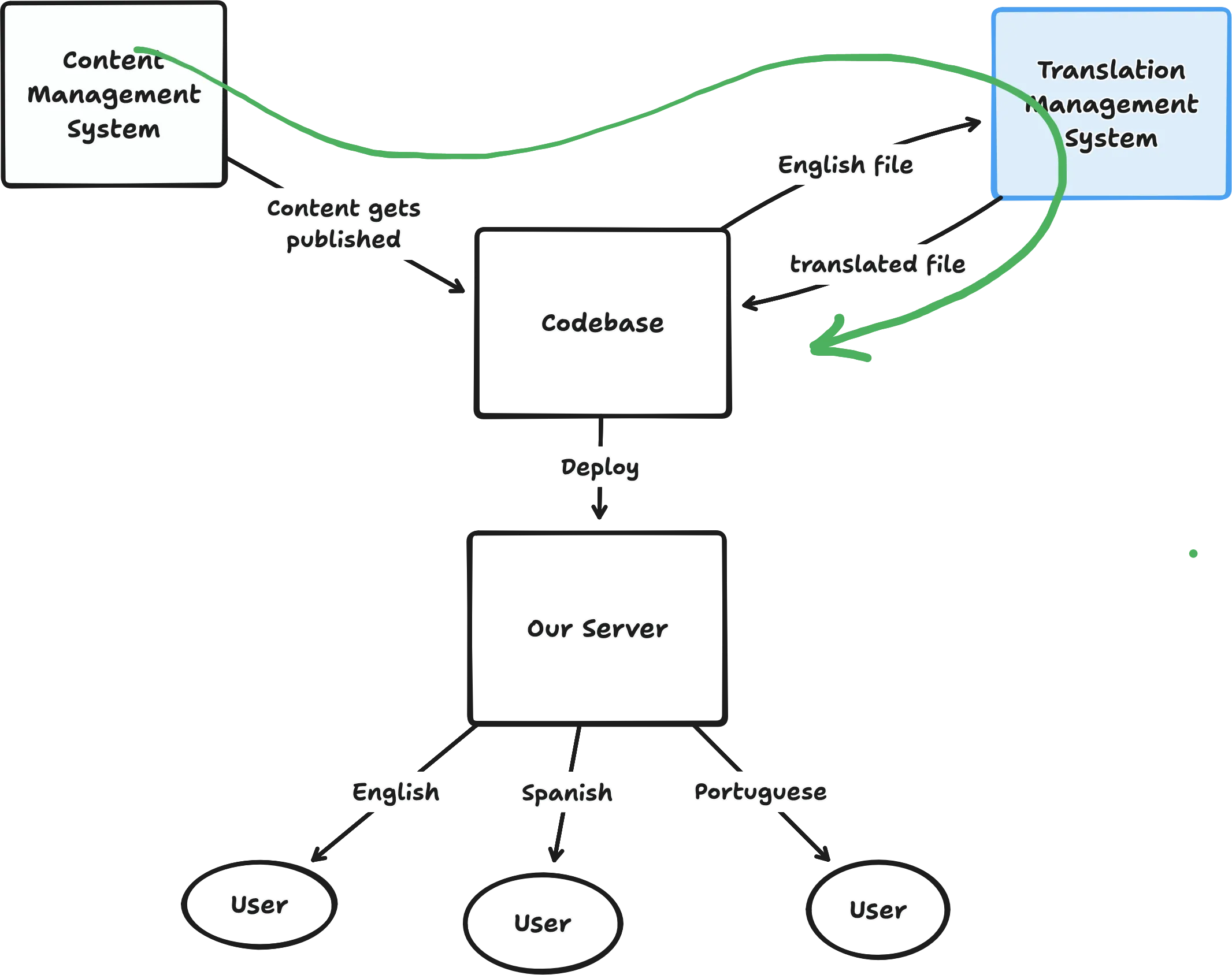
The green arrow represents the flow of content through our system. A good integration automates as of this flow as possible.
An overview of TMS options (as well as a proposed TMS integration plan for BizX’s MyAccount app) can be found in this decision doc.